Core Gameplay Loop
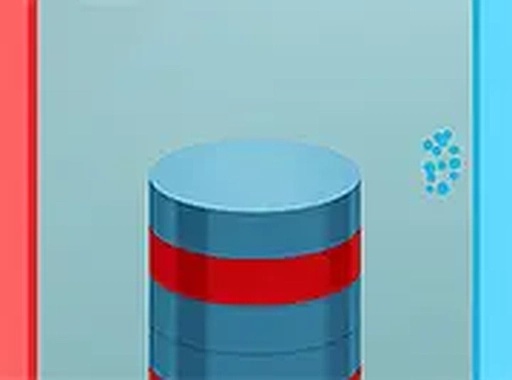
In Color Spin Toss, players stand atop a column of colored disks. Each disk displays either a red or blue hue. The objective is to toss each disk to the matching side—left for red, right for blue. A correct throw adds to the score and fills a special meter. A miss or wrong side ends the run. The tower rises with each success, making the game faster and more demanding.
Visual Design and Feedback
The game uses bright, saturated colors that make hue identification instant. Clear visual cues—like a flash on correct throws and a subtle shake on misses—keep players informed. The 3D perspective gives depth to the tower, helping players gauge distance and timing. The clean interface avoids clutter, letting you focus on the task at hand.
Power-Ups and Boosts
During play, special items appear that can temporarily aid your progress. For example, a slow-motion power-up reduces the game speed for a few seconds, giving you breathing room. Another boost might double points for a short period. These items appear randomly and can be collected by tossing a disk through them. Using them wisely can extend your session and push your score higher.
Progression and Challenge
The difficulty ramps up naturally. Early rounds are slow, letting you get comfortable with the controls. As your streak grows, disks appear faster and the tower becomes taller, requiring quicker decisions. There is no set level limit—the game continues until a mistake ends the run. This creates a high replay value, as each attempt feels fresh and the challenge adapts to your skill.
Accessibility and Controls
Color Spin Toss works on both desktop and mobile devices. On a computer, use the mouse to aim and click to throw. On a touch screen, simply tap and drag. The controls are responsive and intuitive, making the game easy to pick up for players of any age. The simple input method ensures that the focus stays on the color-matching challenge, not on complex button combinations.






Comments
0 comments