Squad Territory Control: Crimson vs Azure Tactics

Squad Territory Control: Crimson vs Azure Tactics

Cooperative Tactics Territory Control Competitive Play

Reviews

Squad Territory Control: Crimson vs Azure Tactics stands out for its emphasis on teamwork over individual skill. The controls are intuitive on both PC and mobile, making it accessible to a wide audience. Maps are well-designed with distinct tactical considerations, and the item collection system adds meaningful progression without feeling grindy. Competitive play is engaging, though the game could benefit from more map variety. Overall, it is a solid choice for players who enjoy cooperative strategy with a vibrant visual style.

About this game

Core Objective & Team Dynamics

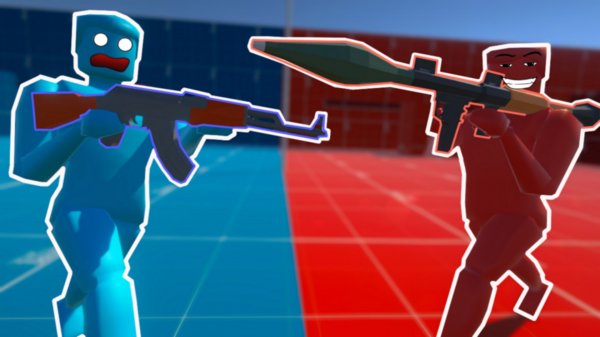
In Squad Territory Control: Crimson vs Azure Tactics, the central goal is to claim and hold key zones while preventing the opposing team from doing the same. Success depends on how well players coordinate with their group. Each match places two factions against each other, and the side that controls the most territory at the end wins. Communication is essential, as teammates must decide when to push forward and when to fall back. The game emphasizes collective effort over individual performance, making every player's role important.

Controls & Platform Adaptations

On a computer, movement is handled through standard keyboard keys, with the mouse used for aiming and interacting with objects. A scroll wheel adjusts the view, and a dedicated key switches between available items. For mobile users, an on-screen joystick controls movement and aiming, with a tap to activate tools. Both control schemes are designed to feel responsive, allowing players to focus on strategy rather than struggling with inputs. The interface is clean, showing team status and territory progress at a glance.

Item Collection & Customization Options

Throughout matches, players can find chests that contain various tools and cosmetic items. These tools provide temporary advantages, such as speed boosts or area-denial effects, which can shift the momentum of a game. Cosmetic skins allow players to personalize their character's appearance, with options tied to their chosen faction's color palette. Collecting these items adds a layer of progression, giving players reasons to keep playing beyond each match's outcome. The customization system is straightforward, letting players equip their preferred look without complicated menus.

Map Awareness & Tactical Play

Each map has a distinct layout with multiple paths, chokepoints, and elevated positions. Learning these routes helps players anticipate enemy movements and set up effective defenses. Some zones are easier to capture but harder to hold, while others require more effort to secure but offer strategic benefits. Teams that spread out to cover multiple areas risk being overwhelmed, while those that stick together may miss opportunities. Balancing aggression with caution is a constant challenge that keeps matches engaging.

Tips for Consistent Performance

Staying aware of the minimap and teammate positions helps avoid being caught off guard. Collecting power-ups early in a match can provide an edge during critical fights. Experimenting with different tools reveals which ones suit your play style best. Supporting teammates who are under pressure often turns the tide more effectively than solo efforts. Practicing movement and tool usage in various situations builds confidence for competitive play.


Compatibility

• OS: Windows 10+, macOS 11+, iOS 14+, Android 10+
• Browsers: Chrome 100+, Safari 15+, Edge 100+, Firefox 100+
• Not compatible with Internet Explorer
Tested on real devices ✅ works as expected

FAQ

Can I play Squad Territory Control: Crimson vs Azure Tactics on both PC and mobile?
Yes, the game is available on both platforms. PC uses keyboard and mouse controls, while mobile relies on a virtual joystick and tap inputs. The core experience remains similar across devices, though some players may prefer one setup over the other.
How long does a typical match last in this game?
Matches are designed to be fast-paced, usually lasting between 5 and 10 minutes. The exact duration depends on how quickly one team secures enough territory to win. This short format makes it easy to play a few rounds during a break.
Are there different maps available in Squad Territory Control: Crimson vs Azure Tactics?
The game includes several maps, each with unique layouts and strategic points. Some maps favor open confrontations, while others have tight corridors that reward ambush tactics. This variety keeps the gameplay fresh and encourages adapting strategies.
Do cosmetic items affect gameplay or are they purely visual?
Cosmetic items like skins are purely visual and do not provide any gameplay advantage. They allow players to express their style and show faction pride. Tools found in chests, however, do have functional effects during matches.
Is there a ranking system or competitive mode in this game?
The game includes a competitive mode where players can climb leaderboards based on their performance. This mode matches players of similar skill levels, creating more balanced and challenging games. Casual play is also available for those who prefer relaxed matches.
Can I form a permanent team with friends in Squad Territory Control: Crimson vs Azure Tactics?
Yes, the game supports party systems that let you invite friends and queue together. Playing with a regular group can improve coordination and make matches more enjoyable. Voice chat or external communication apps are often used for real-time planning.

Comments

0 comments
U
User
Loading comments...

Similar Products

Obstacle Course Party Online Game

obstacle course party game online multiplayer

PLAY NOW

Alliance of Eldyn: Cooperative RPG Quest

Team-Based RPG Online Multiplayer Fantasy Adventure

PLAY NOW

Squad Territory Control: Crimson vs Azure Tactics

Cooperative Tactics Territory Control Competitive Play

PLAY NOW