Core Interaction Model
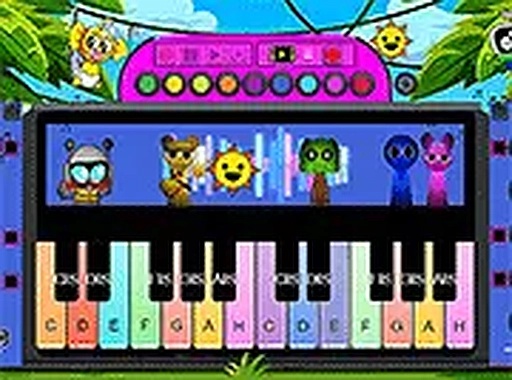
Every key on your computer keyboard corresponds to a piano note, displayed on a colorful on-screen keyboard. Pressing a key immediately produces a clear tone, allowing you to string notes together in real time. This direct mapping makes it easy to understand how individual sounds combine into melodies. The interface responds instantly, so there is no lag between pressing a key and hearing the result.
Structured Song Tutorials
For those who prefer guided learning, the studio offers step-by-step lessons for popular tunes. Each song is broken into short segments, with highlighted keys showing exactly which notes to press. You can repeat any section as many times as needed, progressing at your own speed. This method helps build note recognition and muscle memory without requiring any prior music knowledge.
Animated Audio Companions
During play, whimsical animated characters appear and add their own sound effects to the music. Each character produces a unique tone or rhythm, layering unexpected textures onto your playing. Their reactions to your key presses provide visual and audio feedback, keeping the experience engaging for younger users while encouraging creative exploration.
User-Friendly Interface
The design prioritizes clarity and accessibility. Large, brightly colored keys are clearly labeled, and a full-screen option removes distractions for focused practice. No downloads, registrations, or payments are required, making it easy to start playing immediately. The studio works across desktop and mobile browsers, ensuring consistent access on different devices.
Open-Ended Creativity
Beyond structured lessons, the studio encourages free experimentation. You can combine notes in any order, try different chord combinations, and discover your own musical patterns. There are no scores, timers, or penalties, so mistakes become part of the creative process. This stress-free approach supports long-term engagement and skill development at your own pace.





Comments
0 comments